
By Sudeep Bath
| August 25, 2026
The difference between a blood pressure device that works in an RPM program and one that doesn’t usually has nothing to do with accuracy. Both cuffs measure fine. The question is whether the reading ever reaches your care team.
That question got more interesting on January 1, 2026, and most of the comparison articles you’ll find on this topic haven’t caught up. For years the whole device debate ran on one number: 16 days of transmitted data in a 30-day period, or CPT 99454 pays nothing. Miss day 16 and a month of nursing work went unbilled. CMS changed that in the CY 2026 Physician Fee Schedule final rule.
So the connectivity decision is still the right decision to obsess over. The reason has changed, and the math has changed with it. Below is what actually differs between cellular and Bluetooth cuffs, what the 2026 codes do to the business case, and how to decide per patient instead of per purchase order.
Key Takeaways
- CPT 99445 took effect January 1, 2026 and pays for device supply with 2 to 15 days of transmitted data in a 30-day period. The 16-day cliff became a step. You can’t bill 99445 and 99454 for the same patient in the same period.
- That doesn’t make connectivity less important. It changes the loss from “you get nothing” to “you get the lower-paying code,” and 99454 sits around $55 a month. Chronic transmission failure now shows up as margin erosion instead of a zero.
- 78% of Americans 65 and older own a smartphone, per Pew Research Center’s 2025 survey. Age is a bad proxy for whether Bluetooth will work. Digital confidence and the number of steps in the workflow are the real variables.
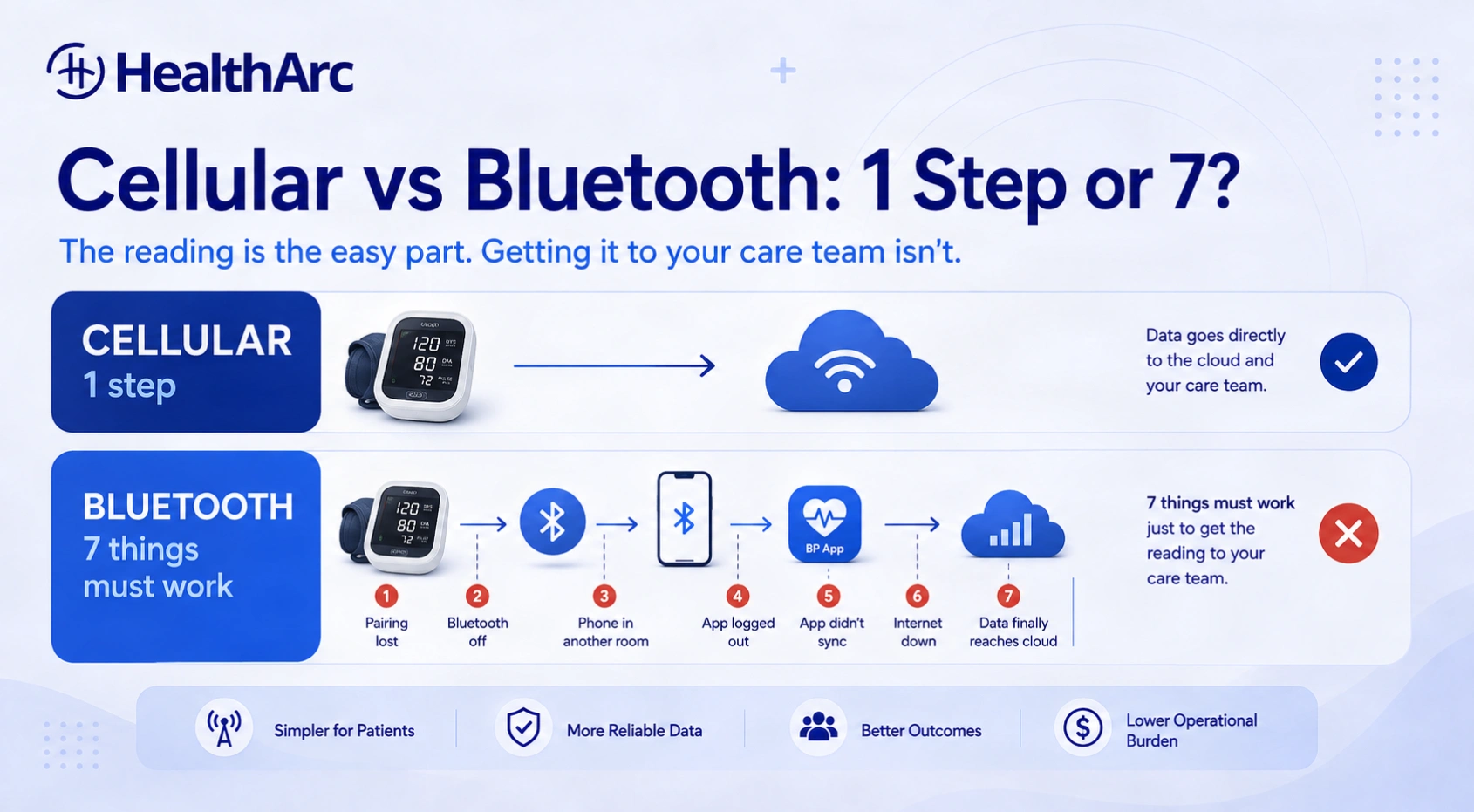
- A cellular cuff has one patient action between measurement and transmission. A Bluetooth cuff has six or seven, and every one of them is a place to fail silently.
- Vendor-published compliance figures for cellular versus Bluetooth circulate widely, typically around 89% against 60% to 75%. Those come from vendor blogs with no published methodology. Run your own numbers on your own panel.
- Track why transmission failed, in categories. A disengaged patient and a patient whose phone updated overnight need completely different interventions, and a single compliance percentage hides both.
Table of Contents
What the 2026 Codes Changed About the Device Decision
CMS released the CY 2026 Physician Fee Schedule final rule on November 5, 2025 and adopted two new remote monitoring codes effective January 1, 2026.
| Code | What it covers | Threshold |
|---|---|---|
| 99454 | Device supply with daily recordings or programmed alerts | At least 16 days of data in 30 days |
| 99445 | Device supply, same devices, shorter window | 2 to 15 days of data in 30 days |
| 99457 | Monitoring treatment management time | First 20 minutes in a calendar month |
| 99470 | Monitoring treatment management time, shorter | First 10 minutes, one interactive contact required |
99445 and 99454 are mutually exclusive for a given patient in a given 30-day period. One or the other, never both. Our guide to CPT 99445 and 99470 covers the documentation requirements.
Here’s why this matters for device selection. Under the old rules a patient who transmitted on 11 days generated exactly $0 of device-supply revenue. All of it gone, and the nursing time spent reviewing those 11 days of readings went with it. That made the 16-day threshold a cliff, and it made connectivity a binary risk.
Now that patient produces a billable 99445 claim. The cliff became a step down.
Some vendors are reading this as permission to relax about device connectivity. That’s the wrong conclusion. HealthArc’s own revenue calculator puts 99454 at roughly $55 a month per enrolled patient, and 99445 pays materially less for the shorter window. Across a panel of 800 patients, a connectivity model that pushes even 15% of your patients from the 16-day code down to the short-window code is a recurring monthly gap, every month, forever. It just doesn’t announce itself as a zero on a report anymore.
That’s the part worth watching. A cliff is visible. Slow margin erosion isn’t.
Cellular vs Bluetooth RPM Devices: The Comparison
| Factor | Cellular BP monitor | Bluetooth BP monitor |
|---|---|---|
| Patient setup | Usually nothing after the device ships pre-activated | Pairing with a phone or tablet, often an app install and login |
| Transmission path | Device to cellular network to platform | Device to Bluetooth to phone to app to platform |
| Failure modes | Weak or absent coverage, SIM or modem faults | Pairing loss, Bluetooth switched off, app logout, OS update, permission changes, phone in another room |
| Connectivity cost | Ongoing cellular service per device | Rides on the patient’s existing data or Wi-Fi |
| Latency | Near real time where coverage exists | Delayed until the next successful sync |
| Hardware cost | Higher, connectivity is built into device and contract | Lower upfront |
| Best fit | Low digital confidence, no reliable smartphone, high-touch programs | App-fluent patients, organization-supplied tablets, strong home Wi-Fi |
| Staff troubleshooting | Lower for pairing and sync issues | Higher, more components have to work at once |
| Main advantage | Fewer patient actions between measurement and transmission | Lower cost and more flexibility |
Neither type guarantees compliance. A cellular cuff transmits nothing from a house with no signal, and a Bluetooth cuff performs beautifully for a patient who already lives on their phone.
The Age Assumption Is Wrong
Almost every article on this topic argues cellular for older patients on the premise that seniors don’t have smartphones. Check the number.
Pew Research Center’s Mobile Fact Sheet, from a survey of 5,022 US adults fielded February 5 to June 18, 2025, puts smartphone ownership at 78% among adults 65 and older. For comparison, it’s 90% among adults 50 to 64 and 97% under 50.
So roughly four in five of your Medicare-age patients own the hardware a Bluetooth workflow needs. Device ownership isn’t the constraint. Something else is.
The constraint is confidence and step count. Owning a smartphone and being willing to troubleshoot a Bluetooth pairing on it at 7 a.m. before breakfast are different capabilities. A patient can be a competent, daily smartphone user for calls, photos and text and still have never intentionally paired an accessory. Nothing about their age tells you which one you’ve got.
Which means age is the wrong segmentation variable. Ask two questions at enrollment instead: have you connected a Bluetooth device before? and is your phone usually in the same room where you’d take your blood pressure? Those two answers predict transmission behavior far better than a birth year. We wrote more about the engagement side in four practical ways to improve RPM engagement for senior patients.
Counting the Steps Between Reading and Platform
Take two patients on the same day.
Margaret has a cellular cuff. She wraps it, presses the button, waits, and the device sends the reading over its own connection. Done.
Robert has a Bluetooth cuff. He wraps it, presses the button, and the reading is now sitting in the device’s memory waiting for a phone. If Bluetooth is off, if the app logged him out after an update, if the phone is charging in the kitchen, if permissions reset, if the pairing never completed properly during onboarding, that reading may never leave the cuff.
Clinically both patients did the right thing. Operationally only one of them produced a billable, reviewable data point.
Here’s the full Bluetooth workload for comparison:
- Keep the cuff charged or stocked with batteries
- Keep the phone or tablet nearby and charged
- Keep Bluetooth switched on
- Maintain a working pairing
- Stay logged into the app
- Keep permissions and background refresh enabled
- Notice when readings stop syncing
Seven ongoing obligations. The cellular version is one: take the reading correctly. That’s the whole argument for cellular, and it holds regardless of what the patient’s birth year is.
The last item on that list is the sneaky one. Patients generally assume that taking a reading means the care team got it. They have no reason to think otherwise, so they won’t call you when transmission stops. You find out at the end of the billing period.
The Real Cost of a Failed Sync
Bluetooth cuffs look cheaper because the hardware is cheaper. Purchase price isn’t cost of ownership.
Work the arithmetic on one failure. A care coordinator notices readings stopped for a patient. She calls, no answer. She calls again the next day, gets him, walks through whether Bluetooth is on, whether the app is open, whether the phone was nearby. Turns out an OS update reset the app’s permissions. That’s maybe 25 minutes across two days, plus the clinical review time she didn’t spend on anyone else, plus a gap in the record, plus a patient who now trusts the program a little less.
Run that across a few hundred patients a month and it’s a staffing line, not an anecdote. The usual causes:
- Lost pairing
- Phone OS update
- Changed app permissions
- Expired login
- Phone in another room during the reading
- Pairing never completed correctly at onboarding
- Patient assuming the reading was received
None of these is a motivated-patient problem. They’re all the same structural problem: the workflow requires several technologies to work at once, in a house you can’t see.
Cellular reduces the count of things that have to work. It doesn’t make the program cheaper by default, though, and anyone who tells you it does is selling. Cellular carries a per-device service cost every month whether the patient uses it or not, and coverage has to be verified before you ship. Our post on cellular devices in RPM programs goes further into the operational tradeoffs.
When a Bluetooth BP Monitor Is the Better Choice
Four situations where Bluetooth is the right call.
The patient already uses connected devices
Somebody who wears a smartwatch, uses a patient portal and has paired headphones will connect a cuff without help. Sending them a cellular device adds monthly service cost and buys you nothing.
You supply a preconfigured tablet or hub
This is the underused option. Ship a locked-down tablet with the app installed, logged in, permissions set and pairing already done. The Bluetooth workflow collapses to almost nothing because you control the environment instead of the patient’s personal phone. No app store, no login, no OS surprises.
Weak cellular coverage but solid Wi-Fi
Rural and some urban interior locations have poor mobile signal and perfectly good home broadband. A Bluetooth cuff on a Wi-Fi tablet is the more dependable build there. Check coverage at the patient’s address, not at the clinic.
A digitally comfortable population
Younger hypertension panels, commercially insured groups, employer programs. Bluetooth is cost-efficient here without adding a real compliance barrier.
No Cell Coverage, No Smartphone: Four Options
A patient with no smartphone looks like a perfect cellular candidate, and usually is. The exception is when they also have no usable cellular signal at home, which happens more often than device vendors admit.
1. Supply a connected tablet or gateway. A preconfigured tablet or a cellular hub bridges the Bluetooth cuff to your platform. You keep control of the technology environment and skip the personal-phone dependency entirely.
2. Use a Wi-Fi capable device. Where home internet is solid, Wi-Fi is a clean transmission path. Still check how much setup lands on the patient. A solution can be technically valid and practically unusable.
3. Verify coverage before you ship. Check the address, not the ZIP code. Shipping a cellular device to a patient who can’t connect costs you the enrollment delay, the return logistics and the patient’s first impression of the program.
4. Build a documented exception pathway. Some patients won’t fit any standard model: no coverage, no compatible phone, no home internet, or not enough digital confidence to manage any of it. Decide in advance what happens to them. Without a defined path, they become repeat support tickets and then they disengage. Our piece on the digital divide in RPM covers this population in more depth.
Accuracy Comes Before Connectivity
Connectivity decides whether the reading arrives. It says nothing about whether the reading is any good.
Check the regulatory status of any device you deploy through FDA’s 510(k) database instead of taking a manufacturer’s word for it, and look for independent validation against a recognized protocol. Our explainer on FDA-cleared RPM devices walks through what the clearances do and don’t mean.
Then remember that a validated device still produces garbage in the wrong hands. Wrong cuff size, reading taken right after climbing stairs, talking mid-measurement, arm dangling below heart level, cuff over a sweater. Any of those and you’ve transmitted a precise number that means nothing, which is worse than no number because somebody may titrate on it.
Three things have to hold together: a suitable device, correct technique, reliable transmission. Onboarding is where you buy the middle one, and it’s the one most programs underfund. See our complete guide to remote blood pressure monitoring for the measurement protocol.
A Patient-Matching Framework
Stop asking “cellular or Bluetooth” as a procurement question. Ask it per patient, at enrollment, against these criteria.
Choose cellular when:
- The patient doesn’t own or regularly use a smartphone
- They’ve never intentionally paired a Bluetooth device
- Their phone usually lives in a different room from where they’d measure
- Verified cellular coverage exists at their address
- You want to hold down patient-side troubleshooting volume
- The program runs at a scale where support headcount is the binding constraint
Choose Bluetooth when:
- The patient already uses apps and connected accessories comfortably
- A smartphone or a tablet you supply is reliably at hand
- Cellular coverage is poor but home Wi-Fi is dependable
- Upfront device cost is a real constraint on program launch
- You have staff and a script for pairing support
The framework beats a standard, and the reason is billing. A mixed fleet costs a little more to administer and produces more patients on 99454 instead of 99445. See the BP monitor options and the wider RPM device catalog for what a mixed fleet actually looks like.
Compliance Is an Operations Problem
When patients miss the transmission threshold it gets logged as noncompliance. That word does a lot of hiding.
Plenty of those patients were willing. The workflow was just harder than the task. So the question to put to your own program is this one: how many actions must a patient complete correctly for one blood pressure reading to become usable RPM data? Count them honestly. The answer should drive device selection, onboarding depth, education and support staffing.
Then instrument the failures. Most platforms tell you whether a patient hit the threshold. Very few tell you why they didn’t. Categorize every miss:
- No reading taken
- Reading taken, never transmitted
- Connectivity failure
- Device malfunction
- Setup or pairing issue
- Incorrect technique
- Patient disengaged
These need different responses. A disengaged patient needs a clinical conversation about why the program matters. A patient whose sync broke needs 10 minutes of tech support and an apology. Reporting them as one number means you’ll apply one intervention to both, and it’ll be the wrong one half the time. This is the question we field most often from programs scaling past a few hundred patients, and it’s almost always a reporting gap rather than a device gap.
For the clinical program design around all of this, see our hypertension management page and the walkthrough of how RPM works for blood pressure management.
Frequently Asked Questions
Does a cellular blood pressure monitor require a smartphone?
No. A cellular-enabled cuff has its own connectivity built in and transmits directly to the RPM platform. The patient’s phone plays no part in the transmission path, which is the entire operational point of the device class.
Is a cellular blood pressure monitor better than a Bluetooth monitor for RPM?
It depends on the patient, not on the technology. Cellular removes pairing and app steps, so it suits patients with limited digital confidence or no reliable phone. Bluetooth works well for app-fluent patients and works very well when the organization supplies a preconfigured tablet. Cellular also carries a monthly service cost per device that Bluetooth doesn’t.
Why do RPM patients need to transmit blood pressure readings consistently?
Two reasons. Clinically, sparse data makes trends unreadable and delays your response to deterioration. Financially, the device supply codes are tied to transmission days: CPT 99454 requires at least 16 days of data in a 30-day period, and CPT 99445 covers 2 to 15 days as of January 1, 2026. Verify current requirements with your MAC, since these rules changed recently.
What should an RPM program do if a patient has no cellular coverage?
Move to a Bluetooth cuff paired with an organization-supplied tablet or gateway on the patient’s home Wi-Fi, or use another Wi-Fi capable solution. The important step is checking coverage at the patient’s address before shipping anything, because the alternative is a return, a delay and a bad first experience.
How can healthcare organizations improve RPM compliance among older adults?
Cut the number of steps between the reading and the platform. Then invest in onboarding that covers measurement technique as well as connectivity, respond fast when transmission stops, and screen for Bluetooth experience at enrollment instead of assuming from age. Pew put smartphone ownership among adults 65 and older at 78% in 2025, so the barrier is usually confidence and workflow rather than hardware.
Are all home blood pressure monitors suitable for remote patient monitoring?
No. An RPM-suitable cuff needs appropriate regulatory clearance for its intended use, independent measurement validation, correct cuff sizing for your population, and the ability to transmit into your platform automatically. A retail cuff the patient reads off a screen and types into a portal doesn’t satisfy the device-supply codes.
What changed for RPM billing in 2026?
CMS adopted CPT 99445 and 99470 effective January 1, 2026, in the CY 2026 Physician Fee Schedule final rule released November 5, 2025. 99445 covers device supply with 2 to 15 days of data in a 30-day period, and 99470 covers the first 10 minutes of management time with one interactive patient contact. 99445 and 99454 can’t both be billed for the same patient in the same period.
Do cellular devices really have higher compliance rates than Bluetooth?
Figures circulate widely, usually around 89% for cellular against 60% to 75% for Bluetooth, but they trace back to vendor blog posts with no published methodology or population description. Treat them as marketing. The mechanism is sound and worth acting on. The specific percentages aren’t evidence, so measure your own panel and segment by device type.
The Short Version
Cellular is usually the stronger choice when your goal is fewer patient actions and steadier transmission, which describes most Medicare hypertension panels. Bluetooth earns its place with app-fluent patients, with organization-supplied tablets, and in homes with good Wi-Fi and poor mobile signal.
Don’t decide on device price. Four questions decide it:
- How easy is the reading itself for this patient?
- How many technical steps sit between that reading and your platform?
- What happens, concretely, when connectivity fails?
- Will you find out before the billing period closes?
That last one now costs you differently than it used to. Missing 16 days no longer zeroes the month, and that’s exactly why it’s easier to stop noticing. A program quietly running half its panel on the short-window code looks healthy on a compliance dashboard and underperforms every month on the P&L.
If you want to see how a mixed cellular and Bluetooth fleet gets managed on one platform, with transmission failures categorized instead of counted, book a demo.
Related reading: Managing CKD, Hypertension and Diabetes in One RPM Program · Cellular Blood Pressure Monitor · Remote Patient Monitoring

Ready to connect care between visits?
See how HealthArc runs RPM, CCM and seven more CMS programs — the platform, the devices and the clinical team — on a single demo.