
By Jack Whittaker
| May 20, 2026
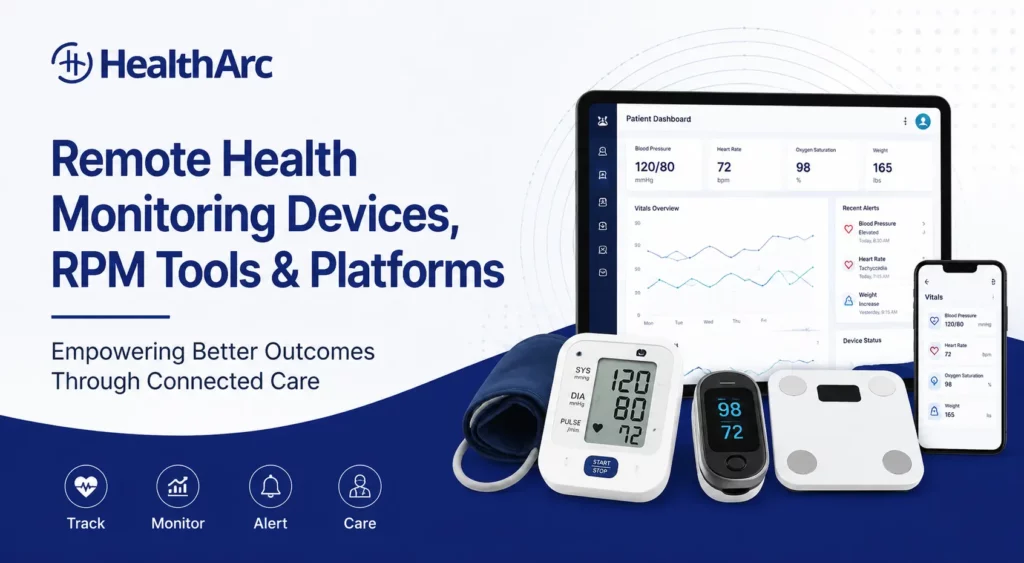
Remote health monitoring devices are no longer just home gadgets. In a well-run remote patient monitoring program, they become the front line of clinical visibility between visits.
Choosing devices?See all eight cellular device categories and the codes each supports. remote patient monitoring devices.
A connected blood pressure monitor can show whether hypertension treatment is working. A weight scale can help flag fluid retention risk in a heart failure patient. A pulse oximeter can help a care team follow respiratory changes. A glucometer can support diabetes management when the patient is outside the clinic.
But the device is only one part of the program.
For providers, the real question is not simply, “Which device should we buy?” It is:
How will this device data move from the patient’s home into a care-team workflow that supports timely action, documentation, and better chronic care management?
That is where remote health monitoring devices and remote patient monitoring software need to work together.
What Are Remote Health Monitoring Devices?
Remote health monitoring devices are connected medical devices used to collect patient health data outside a traditional care setting. The data may be transmitted through cellular, Bluetooth, Wi-Fi, or app-based workflows to a healthcare provider or monitoring platform.
CMS describes remote patient monitoring as a model where patients collect health data such as blood pressure, weight, and glucose levels using connected medical devices that transmit data to their healthcare provider.
In practice, these devices help providers monitor patients between visits, especially when the patient has a chronic condition, post-discharge risk, or care plan that depends on regular physiologic data.
Common remote health monitoring devices include:
- Blood pressure monitors
- Weight scales
- Glucometers
- Pulse oximeters
- Spirometers
- Thermometers
- ECG or cardiac monitoring devices
- Continuous glucose monitoring workflows
- Wearables for heart rate, activity, sleep, and movement
- Medication adherence devices
The best device is not always the most advanced device. The best device is the one the patient will actually use and the care team can act on.
Remote Monitoring Devices, Tools, Technologies, Platforms, and Equipment
Healthcare teams often use several similar terms when evaluating remote care programs. Each term points to a different part of the same ecosystem.
| Term | What It Usually Means | Provider Takeaway |
|---|---|---|
| Remote patient monitoring devices | Clinical devices used in RPM programs | Choose by condition, usability, connectivity, and data quality |
| Remote patient monitoring tools | Devices plus workflow features that help run the program | Look for alerts, documentation, dashboards, and reporting |
| Remote monitoring technologies | The broader technology stack behind RPM | Includes devices, connectivity, data transfer, analytics, and EHR workflows |
| Remote patient monitoring platforms | Software systems that collect and organize device data | The platform should turn readings into care-team action |
| Medical monitoring devices | Clinical-grade devices used to measure physiologic data | Check accuracy, regulatory status, and intended use |
| Remote monitoring equipment | Hardware used for home monitoring | Consider shipping, setup, replacement, and patient support |
| Telehealth monitoring devices | Devices used alongside virtual care | Useful when virtual visits need objective patient data |
| Digital health monitoring devices | Connected health devices, sometimes clinical and sometimes consumer-grade | Separate wellness data from clinically actionable data |
For provider organizations, the best answer is rarely one device. It is the right combination of device, software, workflow, and support model.
Remote Health Monitoring Devices vs Remote Patient Monitoring Devices
People often use these terms interchangeably, but there is a small difference.
Remote health monitoring devices is the broader phrase. It can include consumer wearables, home health devices, wellness trackers, and connected medical devices.
Remote patient monitoring devices usually refers to devices used in a formal healthcare program where patient data is reviewed by a provider or care team.
For healthcare organizations, the more important distinction is whether the device is:
- Clinically appropriate for the condition
- Accurate enough for the care plan
- Easy enough for the patient to use
- Connected to a workflow the care team can manage
- Supported by documentation and billing requirements when used for RPM
How Remote Health Monitoring Devices Work
Most remote health monitoring device programs follow a simple path:
- A provider identifies a patient who needs monitoring.
- The patient receives or uses a connected device.
- The device records health data at home.
- Data is transmitted through cellular, Bluetooth, Wi-Fi, or an app.
- The care team reviews readings in a remote monitoring platform.
- Alerts, outreach, documentation, and follow-up happen when needed.
The device captures the reading. The platform turns the reading into a workflow.
That difference matters. A practice can buy excellent devices and still fail if no one owns patient onboarding, missed readings, abnormal values, documentation, or escalation.
Remote Patient Monitoring Tools vs Remote Patient Monitoring Platforms
Remote patient monitoring tools and remote patient monitoring platforms are often discussed together, but they are not the same.
Remote patient monitoring tools can include:
- Blood pressure cuffs
- Weight scales
- Glucometers
- Pulse oximeters
- Patient messaging tools
- Alerting tools
- Documentation templates
- Billing support tools
A remote patient monitoring platform is the system that brings those tools together.
An RPM platform should help care teams:
- Enroll patients
- Assign devices
- Track device activation
- Review readings
- Prioritize alerts
- Follow up on missed readings
- Document care activity
- Support RPM billing workflows
- Report on program performance
If a vendor only provides devices, the provider still has to build the workflow. If a vendor only provides software, the provider still needs a device and patient-support strategy. A scalable RPM program usually needs both.
Types of Remote Health Monitoring Devices
1. Blood Pressure Monitors
Blood pressure monitors are among the most common remote health monitoring devices because hypertension is widespread and often poorly controlled between visits.
They are commonly used for:
- Hypertension management
- Medication titration support
- Cardiovascular risk monitoring
- Pregnancy-related blood pressure monitoring when appropriate
- Post-discharge follow-up
For providers, home blood pressure data can be more useful than one office reading because it shows patterns over time. The workflow should account for missed readings, high readings, repeat checks, and escalation thresholds.
2. Weight Scales
Connected weight scales are often used for patients with heart failure, obesity, kidney disease, and other conditions where weight changes may matter clinically.
They are commonly used for:
- Heart failure monitoring
- Fluid retention risk
- Obesity and weight-management programs
- Chronic disease care plans
- Post-discharge monitoring
A weight scale is simple, but the interpretation can be complex. A small day-to-day change may not matter for one patient but may be important for another. Good RPM workflows allow care teams to set thresholds and review trends in context.
3. Glucometers
Connected glucometers support diabetes management by transmitting blood glucose readings to a care team or monitoring platform.
They are commonly used for:
- Type 1 diabetes support
- Type 2 diabetes management
- Medication adherence review
- High-risk patient monitoring
- Care-plan adjustment
For diabetes programs, device data should not live alone. It should connect with medication review, nutrition counseling, lab trends, and patient engagement.
4. Pulse Oximeters
Pulse oximeters measure oxygen saturation and pulse rate. They are often used for respiratory and cardiopulmonary monitoring.
They are commonly used for:
- COPD
- Asthma
- Respiratory infection recovery
- Post-hospital monitoring
- High-risk cardiopulmonary patients
Pulse oximetry can be useful, but it requires thoughtful thresholds and patient education. Poor device placement, cold hands, nail polish, and other factors can affect readings. Care teams should avoid treating every single reading as equally urgent without clinical context.
5. Spirometers and Respiratory Devices
Spirometers and connected respiratory devices help providers monitor pulmonary function and symptoms in selected patients.
They are commonly used for:
- COPD
- Asthma
- Pulmonary rehabilitation
- Respiratory disease follow-up
- Post-acute respiratory monitoring
These devices can be valuable for specialty programs, but they usually require more patient coaching than a scale or blood pressure cuff.
6. Thermometers
Connected thermometers are simple devices but can support monitoring for fever trends, infection risk, and post-procedure concerns.
They are commonly used for:
- Post-surgical monitoring
- Oncology support
- Infection follow-up
- Pediatric care programs
- High-risk immunocompromised patients
Thermometers are most useful when paired with clear symptom questions and escalation instructions.
7. ECG and Cardiac Monitoring Devices
Remote cardiac monitoring devices may track rhythm, heart rate, or other cardiac signals depending on device type and clinical use.
They are commonly used for:
- Arrhythmia monitoring
- Cardiology follow-up
- Post-procedure monitoring
- High-risk cardiac patients
- Specialist-led monitoring programs
Cardiac monitoring often involves stricter device selection, clinical review, and specialty workflows than general RPM programs.
8. Wearables
Wearables may track heart rate, activity, sleep, mobility, falls, and other health indicators. Some are consumer wellness devices, while others are clinical-grade or used in structured care programs.
They are commonly used for:
- Activity monitoring
- Fall-risk programs
- Cardiac wellness
- Sleep-related insights
- Rehabilitation and mobility tracking
Wearables can create a lot of data. Providers should decide in advance which data points are clinically useful and which are noise.
9. Medication Adherence Devices
Medication adherence devices and connected pill systems can help care teams understand whether patients are following treatment plans.
They are commonly used for:
- Chronic disease management
- Polypharmacy risk
- Older adult care
- Behavioral health support
- High-risk medication programs
These devices are strongest when paired with pharmacist review, care coordination, and patient outreach.
Telehealth Monitoring Devices and Remote Physical Exam Devices
Remote health monitoring can also include devices used during virtual visits or home-based clinical assessments. These tools help providers collect objective information when the patient is not physically in the clinic.
Common examples include:
- Digital stethoscopes
- Otoscopes for ear exams
- Connected exam cameras
- ECG devices
- Pulse oximeters
- Thermometers
- Blood pressure monitors
- Home exam kits used by patients, caregivers, or clinical staff
Remote physical exam devices can be useful in telehealth programs, school-based care, employer clinics, urgent care triage, home health, and hybrid care models.
However, they are not always the same as RPM devices. Remote physical exam tools are often used during a specific virtual encounter, while RPM devices are usually used for ongoing monitoring over days, weeks, or months.
| Category | Typical Use | Example |
|---|---|---|
| RPM devices | Ongoing monitoring over days or months | Blood pressure cuff used for hypertension monitoring |
| Telehealth monitoring devices | Objective data during a virtual care workflow | Pulse oximeter used before or during a video visit |
| Remote physical exam devices | Exam support when the clinician is not physically present | Digital stethoscope or otoscope |
If the goal is recurring chronic disease monitoring, choose RPM devices and an RPM platform. If the goal is to improve virtual visit exams, evaluate remote physical exam devices separately.
Cellular vs Bluetooth vs Wi-Fi Devices
Connectivity is one of the most important device decisions.
| Device Type | Best Fit | Strength | Watch Point |
|---|---|---|---|
| Cellular devices | Older adults, low-tech patients, rural patients, programs that need less setup | No home Wi-Fi or smartphone pairing required | Usually higher device cost |
| Bluetooth devices | Patients comfortable with smartphones | Good device variety and app-based engagement | Pairing and app setup can create support burden |
| Wi-Fi devices | Patients with stable home internet | Can support continuous home use | Not ideal for patients with unreliable internet |
| App-based or manual workflows | Lower-acuity or hybrid programs | Flexible and lower cost | More manual entry and adherence risk |
For many provider-led RPM programs, cellular devices reduce friction because the patient does not need to pair a device or maintain Wi-Fi connectivity. That can be especially helpful for older adults and patients who are less comfortable with apps.
Remote Patient Monitoring Device Manufacturers vs RPM Solution Providers
Some organizations look first for remote patient monitoring device manufacturers. That can make sense if the organization already has the software, clinical staffing, patient support model, documentation workflow, and billing process in place.
For many providers, however, buying devices alone is not enough.
There are three layers in the market:
| Layer | What They Provide | What They Usually Do Not Provide |
|---|---|---|
| Device manufacturers | Hardware such as cuffs, scales, glucometers, oximeters, or ECG devices | Full clinical workflow, billing support, care-team operations |
| Connectivity partners | Device logistics, cellular gateways, data transmission, APIs | Complete provider-facing RPM program |
| RPM platforms and service providers | Software, dashboards, workflows, documentation, support models | They may use third-party device manufacturers |
For providers, buying directly from a device manufacturer may work if the organization already has the software, staff, and workflow. If the organization needs a complete program, an RPM platform or service provider is usually a better fit.
HealthArc fits in the RPM platform and service-provider layer. It helps connect remote monitoring equipment with care-team workflows, documentation, and program operations.
Which Conditions Are Best Suited for Remote Health Monitoring Devices?
Remote health monitoring devices are most useful when regular data can change care decisions.
Hypertension
Best-fit devices:
- Blood pressure monitor
- Weight scale when cardiovascular risk is present
Why it helps:
- Home readings show treatment response
- Providers can identify uncontrolled blood pressure earlier
- Medication adjustments can be based on trends, not one office reading
Diabetes
Best-fit devices:
- Glucometer
- Weight scale
- Blood pressure monitor
- CGM workflow where appropriate
Why it helps:
- Blood glucose data supports medication and lifestyle review
- Trends can show adherence or risk
- Care teams can identify patients who need outreach
Heart Failure
Best-fit devices:
- Weight scale
- Blood pressure monitor
- Pulse oximeter
Why it helps:
- Weight changes may indicate fluid retention
- Blood pressure and pulse trends support medication review
- Care teams can intervene earlier when readings change
COPD and Respiratory Conditions
Best-fit devices:
- Pulse oximeter
- Spirometer
- Thermometer when infection risk is relevant
Why it helps:
- Oxygen and symptom trends support escalation decisions
- Changes may be visible before a scheduled visit
- Care teams can pair device data with symptom check-ins
Post-Discharge Care
Best-fit devices:
- Blood pressure monitor
- Weight scale
- Pulse oximeter
- Thermometer
- Condition-specific device based on discharge diagnosis
Why it helps:
- Supports follow-up after hospitalization
- Helps identify early warning signs
- Gives care teams objective data during transition periods
What Providers Should Look for in Remote Health Monitoring Devices
Choosing devices only by price is a mistake. Device cost matters, but failed activation, missing readings, and staff support time can cost more.
Use this checklist before selecting devices.
1. Clinical fit
The device should match the condition and the care plan. A hypertension program needs reliable blood pressure readings. A heart failure program may need weight monitoring. A COPD program may need oxygen saturation and symptom data.
2. Patient usability
A device that is technically excellent but difficult to use will fail in the real world.
Ask:
- Does the patient need a smartphone?
- Does the device require Wi-Fi?
- Is the display easy to read?
- Can patients with limited dexterity use it?
- Is setup simple enough for the target population?
3. Data transmission reliability
Remote monitoring depends on consistent transmission. If data fails to reach the care team, the program becomes manual.
4. Accuracy and regulatory status
For clinical programs, providers should understand whether the device is appropriate for medical use and whether it meets relevant regulatory expectations. The FDA notes that wireless technology can be used for remote patient monitoring and transferring data from medical devices to other platforms.
5. Integration with RPM software
Device data should flow into the platform where care teams work. If staff need to log into multiple device portals, the workflow becomes harder to scale.
6. Alert and escalation logic
The platform should help distinguish normal variation from actionable changes. Otherwise, care teams may face alert fatigue.
7. Documentation support
For provider programs, readings, outreach, and care activity need to be documented clearly.
8. Billing workflow support
When devices are used as part of a reimbursable RPM program, billing requirements matter. HHS lists common RPM codes such as 99453, 99454, 99457, 99458, and 99091. For example, 99454 is tied to monthly RPM data and requires 16 or more days of readings over a 30-day period.
Best Remote Patient Monitoring Devices: How to Judge “Best”
There is no single best remote patient monitoring device for every provider or every patient.
The best device depends on:
- The condition being monitored
- The patient’s comfort with technology
- The required reading frequency
- The care team’s staffing model
- Whether cellular connectivity is needed
- Whether readings need to support billing documentation
- Whether the device data flows into the RPM platform
| Patient Need | Better Device Fit |
|---|---|
| Hypertension monitoring | Connected blood pressure monitor |
| Heart failure monitoring | Connected weight scale plus blood pressure monitor |
| Diabetes management | Connected glucometer or CGM workflow |
| COPD monitoring | Pulse oximeter and respiratory workflow |
| Post-discharge follow-up | Condition-specific kit based on discharge diagnosis |
| Low-tech patient population | Cellular devices with minimal setup |
The best remote patient monitoring software should make these devices easier to manage, not harder. It should show which patients are active, which readings are missing, which alerts need review, and which follow-ups are complete.
Best Remote Patient Monitoring Software in 2025 and Beyond
Organizations comparing RPM software usually need a platform, not just devices.
When evaluating RPM software, providers should look for:
- Device compatibility
- Cellular and Bluetooth workflow support
- Patient enrollment tools
- Alert triage
- Care-team dashboard
- Documentation support
- RPM billing workflow support
- EHR integration options
- Reporting by patient, provider, location, and program
- SaaS, full-service, or hybrid service options
HealthArc’s remote patient monitoring software is designed for provider-led programs that need devices, dashboards, documentation, and care-team workflows in one place.
If you are comparing platforms, the key question is simple:
Will this software help our team act on patient data, or will it just create another dashboard?
Remote Health Monitoring Devices and RPM Billing
Remote health monitoring devices are closely tied to RPM billing because device setup, data transmission, and care-team review are part of the workflow.
Common RPM billing codes include:
| Code | General Purpose |
|---|---|
| 99453 | Initial device setup and patient education |
| 99454 | Device supply and data transmission during a 30-day period |
| 99457 | First 20 minutes of RPM treatment-management services |
| 99458 | Additional 20-minute increments of RPM treatment-management services |
| 99091 | Collection and interpretation of physiologic data by a physician or qualified healthcare professional |
Important: device billing is not just about handing a patient a device. Programs need documentation, data collection, patient communication, and compliance with payer rules.
Providers should also avoid treating RPM as a billing shortcut. The strongest programs are designed around patient need first, then supported by appropriate reimbursement workflows.
Why Device Data Alone Is Not Enough
Remote health monitoring devices can collect useful information, but devices do not manage patients by themselves.
Providers still need:
- Patient enrollment workflows
- Device setup and education
- Missed-reading follow-up
- Alert review
- Escalation protocols
- Documentation
- EHR integration
- Billing support
- Program reporting
This is why HealthArc combines remote health monitoring devices with remote patient monitoring software, care-team workflows, documentation support, and flexible RPM service models.
How HealthArc Supports Remote Health Monitoring Devices
HealthArc helps healthcare organizations connect devices, data, workflows, and care teams in one RPM program.
With HealthArc, providers can support:
- Connected device workflows
- Patient onboarding and activation
- Care-team dashboards
- Vitals and trend monitoring
- Missed reading follow-up
- Alert review and escalation
- Documentation and reporting
- RPM billing workflow support
- SaaS, full-service, or hybrid RPM models
HealthArc also supports broader care programs that often overlap with RPM, including:
- Chronic Care Management
- Principal Care Management
- Advanced Primary Care Management
- Remote Therapeutic Monitoring
- Transitional Care Management
Build a Device-Enabled RPM Program With HealthArc
Remote health monitoring devices work best when they are connected to the right care workflow.
If your organization wants to launch or scale remote patient monitoring, HealthArc can help you choose the right device model, manage patient workflows, support documentation, and build an RPM program that fits your care team.
Book a Demo with HealthArc to see how our remote patient monitoring services can support your providers and patients.
Remote Health Monitoring Device Selection Checklist
Use this checklist before launching or expanding a device program:
- Which conditions are we monitoring?
- Which readings will change care decisions?
- Which patients need cellular devices instead of app-based devices?
- Who will train patients on device use?
- Who will follow up on missed readings?
- What thresholds trigger alerts?
- Who reviews alerts?
- How will device data appear in the care-team workflow?
- What documentation is required?
- Which codes and payer rules apply?
- How will we measure program performance?
Common Mistakes to Avoid
Mistake 1: Choosing devices before defining the care model
Start with the patient population and clinical workflow. Then choose devices.
Mistake 2: Buying devices that patients cannot use
If setup is difficult, readings will be inconsistent. For some populations, cellular devices may be better than app-based devices.
Mistake 3: Sending every alert to the same queue
Not every reading needs the same response. Good programs define thresholds, triage rules, and escalation paths.
Mistake 4: Treating RPM as only a billing program
Billing may support the program, but patient care should drive the design.
Mistake 5: Ignoring documentation
Remote monitoring must create a record of what happened: readings, review, communication, and follow-up.
Mistake 6: Running devices outside the EHR or care workflow
If the RPM platform becomes another disconnected portal, staff adoption will suffer.
Final Takeaway
Remote health monitoring devices can help providers see what is happening between visits, especially for patients with chronic disease, post-discharge risk, or ongoing care needs.
But devices are only useful when the data leads to action.
The strongest remote monitoring programs connect four pieces:
- The right device for the patient
- Reliable data transmission
- A care-team workflow for review and follow-up
- Documentation and reporting that support clinical and operational goals
HealthArc brings those pieces together through remote patient monitoring software, connected device workflows, and flexible RPM services for provider-led care programs.
Ready to build a better remote monitoring program? Book a demo with HealthArc.
FAQs About Remote Health Monitoring Devices
What are remote health monitoring devices?
Remote health monitoring devices are connected devices that collect patient health data outside the clinic and transmit it to a healthcare provider or monitoring platform. Common examples include blood pressure monitors, weight scales, glucometers, pulse oximeters, spirometers, thermometers, and connected wearables.
What is the difference between remote health monitoring and remote patient monitoring?
Remote health monitoring is a broad term that can include wellness, home health, and clinical device tracking. Remote patient monitoring usually refers to a formal provider-led program where patient physiologic data is reviewed by a care team.
Which remote health monitoring devices are most common?
The most common devices include blood pressure monitors, weight scales, glucometers, pulse oximeters, thermometers, spirometers, and cardiac monitoring devices.
Are remote health monitoring devices covered by Medicare?
Medicare may reimburse certain remote patient monitoring services when requirements are met. Common RPM codes include 99453, 99454, 99457, 99458, and 99091. Coverage depends on patient eligibility, documentation, payer rules, and program workflow.
Are cellular RPM devices better than Bluetooth devices?
Cellular devices are often easier for patients who do not have smartphones, reliable Wi-Fi, or comfort with app pairing. Bluetooth devices can work well for tech-comfortable patients but may require more setup support.
What conditions can be monitored remotely?
Common conditions include hypertension, diabetes, heart failure, COPD, asthma, obesity, post-discharge recovery, and other chronic or high-risk conditions where regular data can support care decisions.
How do providers choose the right remote monitoring devices?
Providers should evaluate clinical fit, patient usability, connectivity, accuracy, regulatory status, data transmission, integration with RPM software, alert workflows, documentation, and billing support.
Does HealthArc provide remote health monitoring devices?
HealthArc supports connected device workflows as part of its remote patient monitoring software and services. HealthArc helps providers connect patient readings, care-team workflows, documentation, and RPM program operations.

Ready to connect care between visits?
See how HealthArc runs RPM, CCM and seven more CMS programs — the platform, the devices and the clinical team — on a single demo.